You can use your SiteWorx username and password to access all folders and files via FTP. However, if you want to create an FTP user account for a specific folder or you don't want to allow access to your root files then you can create a separate FTP account.
1. Log into your SiteWorx account. (e.g. www.example.com:2443/siteworx/ )
2. Under SiteWorx Menu, click the Hosting Features menu item if it is not already open.
3. Click the FTP menu item and then click on Accounts option.
4. Under the Add an FTP Account field, fill in the following details:
5. Click on the Add button.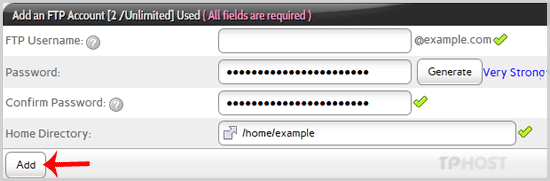
Now you can access your FTP Account by using your newly-created FTP account like:
